
Top 3 GoDaddy.com Hosting Alternatives 2026
Explore the top 3 GoDaddy.com alternatives for reliable hosting solutions. Compare to make an informed decision for your business needs.

Most business owners think launching a website is simple: pick a template, add content, hit publish. The reality is far more complex. A successful WordPress website launch requires careful planning across discovery, design, development, testing, and deployment phases. Without understanding this structured process, you risk delays, budget overruns, and a site that fails to deliver results. This guide walks you through each critical phase, common pitfalls to avoid, and practical strategies to ensure your 2026 launch drives real business growth.
| Point | Details |
|---|---|
| Five critical phases | Website launches require discovery, design, development, testing, and deployment stages to succeed. |
| Planning prevents problems | Clear communication and structured preparation reduce costly mistakes and timeline delays. |
| Pre-launch optimization matters | Speed, SEO, and mobile readiness directly impact lead generation from day one. |
| Managed services save time | Delegating technical complexity lets you focus on business growth instead of troubleshooting. |
| Post-launch work is essential | Ongoing updates, analytics monitoring, and marketing drive sustained performance in 2026. |
The website launch process includes discovery, design, development, testing, and launch phases that each serve distinct purposes. Understanding these stages helps you set realistic expectations and avoid common frustrations.
The discovery phase defines your business goals, target audience, and content requirements. You identify what problems your site will solve and how visitors should interact with your brand. This foundation prevents scope creep later.
Design focuses on visual identity and user experience. Your team creates mockups that align with branding guidelines while ensuring intuitive navigation. This phase establishes the look and feel before any code gets written.
Development builds functionality on WordPress using tools like Elementor Pro. Developers implement features, integrate third-party services, and ensure the site architecture supports your business objectives. Performance optimization starts here, not after launch.
Testing validates everything works correctly across devices and browsers. Teams check for broken links, slow load times, form errors, and accessibility issues. Thorough testing catches problems before real customers encounter them.
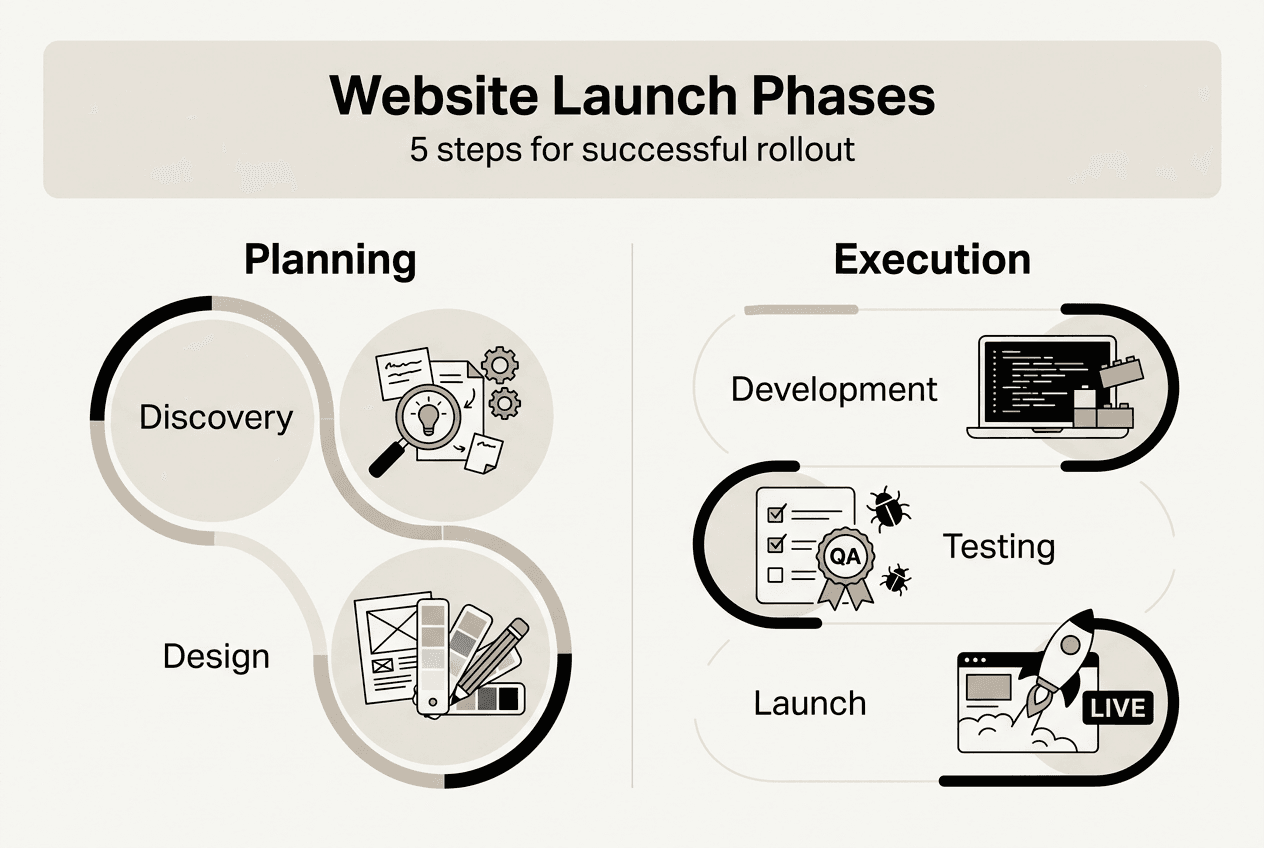
The launch phase deploys your site to production with final backups and monitoring in place. DNS changes point your domain to the new server. Post-launch, you monitor analytics and user feedback to identify quick wins.
Pro Tip: Document decisions and requirements during discovery. Written specifications prevent miscommunication between stakeholders and reduce revision cycles during later phases.
Clear goals at each phase keep projects on schedule. When everyone understands what success looks like at discovery, design, development, testing, and launch, you minimize delays and budget surprises. The how to launch a WordPress website process becomes predictable and manageable.
Most business owners encounter technical and communication obstacles when launching sites without expert help. Recognizing these patterns helps you proactively address them.
Lack of project management creates chaos. Without clear timelines, task assignments, and milestone tracking, deadlines slip. Teams lose visibility into progress. Stakeholders discover problems too late to fix them efficiently.
Technical issues multiply without WordPress specialists. Plugin conflicts break functionality. Server configurations cause performance bottlenecks. Security vulnerabilities expose your business to risk. DIY attempts often create more problems than they solve.
Inadequate testing leads to embarrassing launch day failures. Forms that don’t submit. Pages that load slowly on mobile. Broken checkout processes. These issues damage credibility and cost revenue.
Scope creep inflates budgets and delays launches. Adding features mid-project without adjusting timelines or resources stretches teams thin. What starts as a simple site becomes an expensive, never-ending project.
The biggest mistake business owners make is underestimating the technical complexity of a professional website launch. What seems simple on the surface requires expertise across design, development, hosting, security, and optimization.
Pro Tip: Engage managed WordPress services early to delegate technical complexity. You focus on business strategy while experts handle implementation details that would otherwise consume your time and energy.
Preventing these challenges requires structured planning and realistic expectations. Define scope clearly during discovery. Build buffer time into schedules. Invest in proper testing. Partner with specialists who understand the avoid DIY website headaches approach and can execute efficiently.
Optimizing site speed, SEO, and mobile responsiveness before launch is critical for lead generation success. These preparations determine whether your site attracts or repels potential customers.
Website design impacts lead generation significantly in 2026. Visitors judge credibility within seconds based on visual presentation and performance.
| Optimization Area | Impact on Lead Generation | Recommended Benchmark |
|---|---|---|
| Page Load Speed | 25% increase in conversions under 2 seconds | Under 2 seconds |
| Mobile Responsiveness | 40% of visitors abandon slow mobile sites | 100% mobile optimized |
| SEO Metadata | 35% higher click-through from search results | Complete for all pages |
| Image Optimization | 30% faster load times with compression | WebP format, under 200KB |
| Accessibility Features | 15% larger addressable audience | WCAG 2.1 AA compliant |
Pro Tip: Schedule plugin and WordPress core updates before launch, then establish a monthly maintenance calendar. Security vulnerabilities emerge constantly. Regular updates prevent exploitation and maintain site stability.
Use a launch readiness checklist to verify all optimization elements. Check that analytics tracking works, backup systems function, SSL certificates install correctly, and redirects preserve SEO value. The website optimization guide 2026 boost conversions provides detailed benchmarks for measuring readiness.
Pre-launch preparation separates high-performance sites from mediocre ones. Invest time optimizing before going live. The alternative is launching with problems that immediately hurt your business reputation and search rankings. The why website design impacts leads 2026 guide service businesses demonstrates how design and technical excellence work together to drive results.
Ongoing optimization and marketing enhance website ROI and audience engagement after your initial launch. The work doesn’t stop when your site goes live.
Regularly update content to maintain relevance and search rankings. Fresh blog posts, updated service descriptions, and new case studies signal to search engines that your site remains active. Stale content causes rankings to decline.
Monitor analytics to understand user behavior and conversion patterns. Track which pages generate leads, where visitors drop off, and what traffic sources perform best. Data-driven decisions improve results faster than guesswork.
Maintain security through consistent updates and backups. WordPress releases security patches regularly. Plugins require updates to fix vulnerabilities. Daily backups protect against data loss from attacks or technical failures.
| Approach | Time Investment | Cost | Technical Risk | Business Impact |
|---|---|---|---|---|
| DIY Management | 10-15 hours/month | Low upfront, high hidden costs | High without expertise | Inconsistent, reactive |
| Managed WordPress Service | 1-2 hours/month oversight | Predictable monthly fee | Minimal with expert support | Proactive, strategic |
Marketing strategies drive traffic and conversions after launch. SEO builds organic visibility over time. PPC campaigns generate immediate qualified leads. Social media nurtures relationships and brand awareness. Email marketing converts prospects into customers.
Key maintenance tasks to schedule regularly:
The website marketing launch approach integrates technical maintenance with growth marketing. Your site becomes a revenue engine rather than a static brochure.
Comparing DIY management versus managed services reveals the true cost of website ownership. DIY saves money initially but demands significant time and carries technical risk. Managed services provide expert support, freeing your schedule for business development activities that generate revenue.
Sustained performance requires commitment to continuous improvement. Monitor metrics, respond to user feedback, and adapt to changing search algorithms. Websites that receive ongoing attention outperform abandoned ones by substantial margins.
Launching a high-performance WordPress site shouldn’t consume months of your time or require hiring an expensive in-house team. MonsterWP handles the entire process from discovery through post-launch optimization.

We build custom websites using Elementor Pro, optimized for speed, security, and lead generation from day one. Our flat fee WordPress designed website pricing starts at $299 per month with no long contracts or hidden costs. You get unlimited content updates, rapid revisions, and expert support without the headache of managing technical details.
Beyond website development, we provide integrated SEO, Answer Engine Optimization, and paid advertising across Google, Meta, LinkedIn, and TikTok. Our complete digital growth systems help you rank in search engines and generate qualified leads consistently. Learn more about how it works and see how we align technical execution with your business goals. Focus on running your business while we handle the website complexity that typically derails launches and drains budgets.
The website launch process includes planning, design, development, testing, and deployment phases that transform business requirements into a live, functional site. Each phase has specific deliverables and success criteria. Clear communication between stakeholders and technical teams prevents costly revisions and timeline delays.
Average launch timelines range from 6 to 12 weeks depending on site complexity, feature requirements, and team availability. Simple brochure sites launch faster than e-commerce platforms or membership sites. Early planning with detailed specifications reduces delays. Projects without clear scope often extend beyond initial estimates.
Optimize site speed through caching and image compression to meet 2026 performance standards. Implement SEO best practices including metadata, keyword targeting, and mobile responsiveness. Complete thorough testing for bugs, broken links, and cross-browser compatibility. The website optimization guide 2026 boost conversions provides detailed preparation checklists.
DIY management saves money upfront but risks technical issues, security vulnerabilities, and time-consuming troubleshooting. Managed services provide expert support, proactive maintenance, and faster problem resolution. Consider your technical expertise, available time, and business priorities. Most business owners find managed services more cost-effective when accounting for opportunity cost. The avoid DIY website headaches guide explains the hidden costs of self-management.
Search algorithms, user expectations, and security threats evolve constantly. Sites that receive ongoing updates maintain rankings and performance. Abandoned sites suffer declining visibility, slower speeds, and increased vulnerability. Regular content updates, analytics monitoring, and technical maintenance ensure your investment continues delivering business results long after the initial launch.
Explore the top 3 GoDaddy.com alternatives for reliable hosting solutions. Compare to make an informed decision for your business needs.

Unlock the power of content optimization strategies that drive results. Discover how to enhance rankings, leads, and revenue effectively!