
Top 3 GoDaddy.com Hosting Alternatives 2026
Explore the top 3 GoDaddy.com alternatives for reliable hosting solutions. Compare to make an informed decision for your business needs.


TL;DR:
- A comprehensive SEO audit identifies underlying technical issues that hinder website performance and rankings. Most small businesses perform superficial checks, overlooking critical factors like crawl errors, Core Web Vitals, and structured data. An effective audit prioritizes actionable insights, assigns ownership, and follows a structured sequence from technical health to AI visibility, ultimately driving meaningful improvements in traffic and revenue.
Running a business is hard enough without your website quietly bleeding traffic you never knew you had. A proper SEO audit guide isn’t a vanity exercise or a one-time plugin scan. It’s the diagnostic that tells you exactly why your competitors are taking calls that should be yours. The problem? Most small business owners run surface-level audits that miss the structural issues doing the real damage. What looks like a content problem is usually a technical problem. What looks like a ranking problem is often a crawling problem. This guide exposes those hidden layers and shows you what a real audit actually covers.
| Point | Details |
|---|---|
| Technical first, content second | Fixing content before resolving crawl errors wastes effort because search engines cannot reach blocked pages. |
| 90-day data window matters | Use at least 90 days of Google Search Console data to identify meaningful trends instead of reacting to noise. |
| Priority classification saves teams | Label every audit finding P0 to P3 with assigned owners and effort estimates so nothing gets ignored. |
| AI visibility is now audit territory | With AI Overviews appearing in nearly half of all queries, structured data and entity clarity must be part of every audit. |
| Audits without action plans fail | Findings without clear next steps create overwhelm, not results. Every audit report needs a prioritized remediation workflow. |
Most business owners think an SEO audit means running a free site checker and skimming a list of red flags. That’s not an audit. That’s a checklist pretending to be a strategy. A thorough SEO audit guide follows a specific sequence: technical health first, then on-page signals, then content quality, then backlinks, and finally, the emerging world of AI search visibility. Skip any layer and you’re solving the wrong problem.
The sequence matters more than most people realize. Fixing content or backlinks has limited impact if search engines cannot reach your pages in the first place. Think of it like renovating a house with a cracked foundation. The new kitchen looks great, but the building is still sinking.
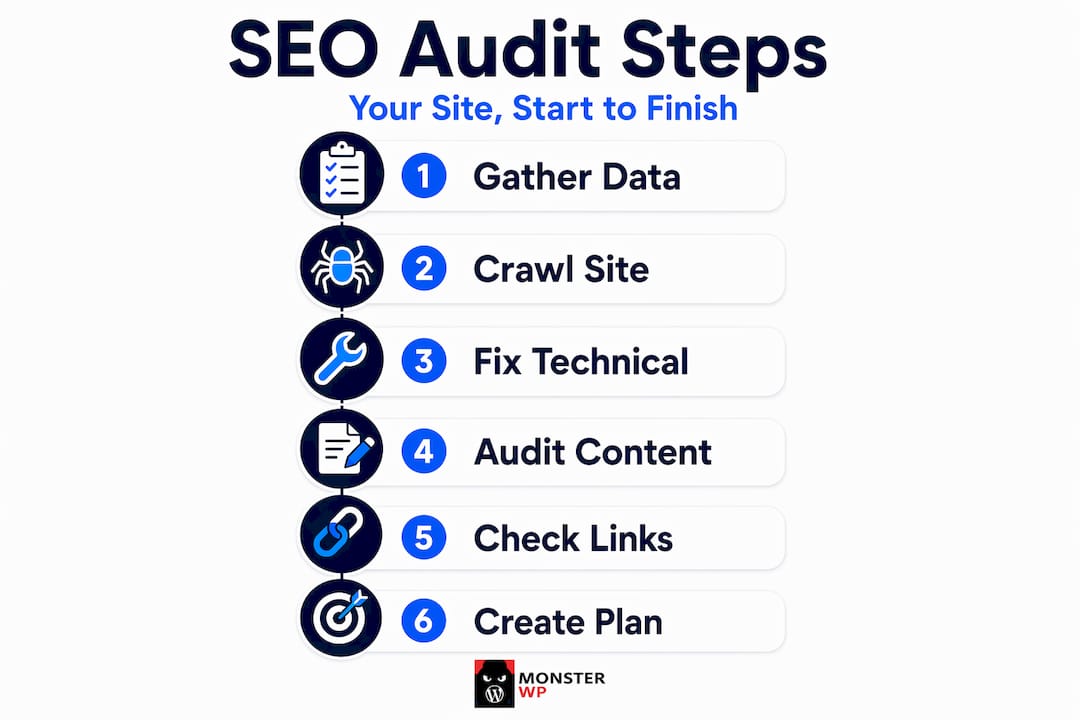
This is where the gap between a real website audit process and a rushed DIY effort becomes costly. Not just in money. In months of wasted effort.
Before you touch a single page, you need the right inputs. No preparation means no reliable conclusions.
The non-negotiables before starting:
Historical data is not optional. A 90-day window tells you whether a traffic dip is a trend or a blip. If you only look at last week, you’ll panic over seasonal fluctuations and ignore slow decay that’s been building for months.
Mindset matters too. The goal of any SEO performance evaluation is not to generate a long list of problems. It’s to identify the three to five issues causing the most damage and fix those first. Eighty percent of your lost traffic usually traces back to a handful of critical failures.
Pro Tip: Before running any crawl, confirm your Google Search Console account has no manual actions pending. A manual penalty makes every other audit finding secondary until it’s resolved.
The false economy of rushing this phase is real. Skipping proper access setup means your crawl tools will return incomplete data, and you’ll spend time optimizing pages that don’t represent your actual traffic patterns. That’s not a small mistake. It’s the kind of error that costs businesses three to six months of misdirected effort.
Technical SEO is the foundation. Nothing else works at scale without it. And it’s where most SMB audits fail hardest, because the problems are invisible until they’re catastrophic.
Here’s what a proper technical review covers:
| Core Web Vital | What it measures | “Good” threshold |
|---|---|---|
| LCP (Largest Contentful Paint) | Load speed of main content | Under 2.5 seconds |
| INP (Interaction to Next Paint) | Responsiveness during full session | Under 200ms |
| CLS (Cumulative Layout Shift) | Visual stability during load | Under 0.1 |
INP replaced FID as a ranking metric in 2024. It evaluates responsiveness over entire user sessions, not just the first interaction. On WordPress sites, this usually means JavaScript bloat and unoptimized plugins are silently killing your scores.
Pro Tip: Run your Core Web Vitals check using both lab data (Lighthouse) and field data (Google Search Console’s Experience report). Lab data tells you what’s possible. Field data tells you what real users are actually experiencing.
These layers require infrastructure-level access to fix correctly. Monsterwp manages all of this behind the scenes, from server configuration to plugin optimization, so the technical foundation is never a liability for the businesses we work with.
Once the technical foundation is solid, the content audit becomes meaningful. Not before. Many sites waste months optimizing content while crawl errors block half their pages from being indexed. Fix the pipes before repainting the walls.
A solid SEO analysis checklist for on-page signals covers:
| Content issue | Recommended action |
|---|---|
| Duplicate titles or meta descriptions | Rewrite with unique, keyword-focused copy |
| Orphan pages with no internal links | Add contextual links from relevant high-traffic pages |
| Declining traffic on old posts | Update with new data, restructure, or consolidate |
| Missing target keywords on key pages | Revise headings and body copy to reflect search intent |
| Pages ranking on page 2 or 3 | Strengthen internal linking and refresh content depth |
Keyword gap and backlink gap tools are particularly useful here. They show you exactly which topics competitors rank for that you don’t, turning competitor research into a prioritized content roadmap rather than guesswork.

You can also dig deeper into optimizing existing content once the technical issues are cleared, but never in the reverse order.
Backlinks remain one of the strongest ranking signals, but the way you audit them has changed. Volume alone means nothing. Quality, relevance, and momentum matter far more.
A backlink audit should examine:
Disavow strategies should be used carefully. Google has gotten better at ignoring low-quality links naturally, but an audit still needs to flag them so you can make an informed decision rather than discover them during a penalty review.
The newer dimension of any serious audit is AI search visibility. AI Overviews now appear in approximately 44% of queries, and ranking number one for those topics can reduce click-through rates by 58 percent. That’s a massive shift in how organic traffic actually works. If you’re not in the AI Overview, you’re losing traffic even when you rank.
Pro Tip: Use structured data markup to make your content machine-readable for AI engines. Properly implemented schema helps Google and AI systems understand exactly what your page covers and who it serves, which increases your chances of appearing in AI-generated summaries. You can explore how structured data drives visibility specifically for service businesses.
AI visibility gaps represent the newest frontier in modern auditing. Classical backlink audits catch what happened. AI visibility audits reveal what’s about to happen to your traffic.
Collecting audit data is the easy part. Turning it into change is where most businesses fail. An audit report that lists 200 issues with no priority order doesn’t create clarity. It creates paralysis.
A functional SEO audit report template follows this structure:
Audit reports that only scan and flag issues generate overwhelm. Reports that assign clear ownership and realistic effort estimates get implemented. That distinction is the difference between an audit that changes your traffic and one that collects dust.
Pro Tip: For most SMBs, a full audit annually or after a major redesign is the right cadence. Pair that with quarterly lightweight checks on key metrics and monthly Core Web Vitals monitoring to stay ahead of silent ranking erosion before it compounds.
I’ve reviewed hundreds of audits run by business owners who thought they had a content problem. Almost every time, the real issue was technical. A robots.txt blocking the wrong directory. A redirect chain adding three seconds to load time. Canonical tags pointing to the wrong URL on a site that was migrated two years ago and never properly cleaned up.
The frustrating part isn’t that these problems exist. It’s that they’re entirely invisible to anyone who doesn’t know exactly where to look. You can spend six months rewriting blog posts and wonder why nothing moves. The answer is sitting in your crawl log, not your content calendar.
What I’ve learned from managing SEO for businesses across dozens of industries is this: the gap between a surface audit and a real audit is measured in months of lost revenue, not just rankings. And the operational cost of running a proper audit, acting on it, and then re-auditing after fixes is something most small teams genuinely cannot absorb alongside running an actual business.
That’s not a failure on your part. It’s a capacity problem. The businesses that grow fastest aren’t the ones doing the most audits themselves. They’re the ones who built infrastructure that catches these problems before they compound. Every hour you spend firefighting technical issues is an hour you’re not spending on customers, products, or growth.
— Vector
Managing a thorough website audit process isn’t a one-time project. It’s an ongoing operational responsibility that compounds when ignored.

Monsterwp builds and manages WordPress websites that are technically sound from day one. No crawl errors left over from sloppy migrations. No Core Web Vitals failures from plugin bloat. No conflicting canonical tags from a developer who handed off and disappeared. Our fully managed WordPress websites are built with SEO structure baked into the foundation, not bolted on afterward. We handle the ongoing monitoring, the Core Web Vitals upkeep, and the technical layer that most audits expose as broken on sites that were “professionally built.” Predictable flat-fee pricing means you always know what you’re paying. No surprise retainers when something needs fixing. If you want digital marketing services layered on top, we do that too.
An SEO audit is a structured review of your website’s technical health, on-page signals, content quality, backlink profile, and search visibility to identify what’s blocking rankings and traffic growth.
Run a full audit annually or after a major site change. Pair it with quarterly metric checks and monthly Core Web Vitals monitoring for active sites.
You need Google Search Console, Google Analytics (GA4), a site crawler, and a keyword research platform as your baseline SEO audit tools. Bing Webmaster Tools adds valuable crawl data that Google’s tools miss.
Most DIY audits focus on surface issues like meta descriptions while missing critical technical problems such as misconfigured robots.txt files, redirect chains, and Core Web Vitals failures that are actively suppressing rankings.
An effective SEO audit report template must include priority-labeled findings (P0 to P3), assigned owners, estimated fix effort, and specific recommended actions for each issue.
Explore the top 3 GoDaddy.com alternatives for reliable hosting solutions. Compare to make an informed decision for your business needs.

Unlock the power of content optimization strategies that drive results. Discover how to enhance rankings, leads, and revenue effectively!