
Local SEO guide: boost your small business visibility
Learn actionable local SEO steps to boost your small business visibility, attract qualified leads, and rank higher without hiring an agency.


Your website is your digital storefront, but outdated content can quietly sabotage your SEO rankings and lead generation efforts. Small business owners often struggle to keep their sites fresh without hiring full-time staff or expensive agencies. This guide walks you through a practical, step-by-step process to update your website content efficiently, improve search visibility, and generate more qualified leads without breaking the bank or your schedule.
| Point | Details |
|---|---|
| Regular updates boost SEO | Regular content refreshes improve search rankings and increase trust with potential clients. |
| Prepare with a content audit | Start with a comprehensive content audit to categorize pages and identify where updates will move the needle. |
| Set clear goals first | Define specific measurable objectives to guide update priorities and measure impact. |
| Use the right tools | Leverage a content management system keyword research analytics and project management to streamline updates. |
| Verify impact after updates | Track rankings, traffic, and conversions to confirm that updates improve SEO and lead generation. |
Updating website content regularly improves search rankings and increases client trust. Search engines prioritize websites that demonstrate ongoing relevance and value. When you refresh your content, you signal to Google and other platforms that your business is active, informed, and committed to serving your audience.
Fresh content does more than satisfy algorithms. It directly impacts how potential clients perceive your business. Outdated service descriptions, old pricing, or references to past years create doubt about whether you’re still operating or paying attention to your market. This erosion of trust translates directly into lost opportunities.
Ignoring content updates creates a compounding problem. Traffic gradually declines as competitors publish newer, more relevant content. Your rankings slip for keywords you once owned. Leads dry up because visitors bounce when they encounter stale information. The longer you wait, the harder it becomes to recover lost ground.
The benefits of consistent updates extend beyond rankings:
“Your website is often the first impression potential clients have of your business. Outdated content suggests outdated service.”
Businesses that prioritize website design impacts leads understand that content freshness is not optional. It’s a competitive requirement in 2026. The good news is that systematic updates don’t require massive time investments when you follow a proven process.
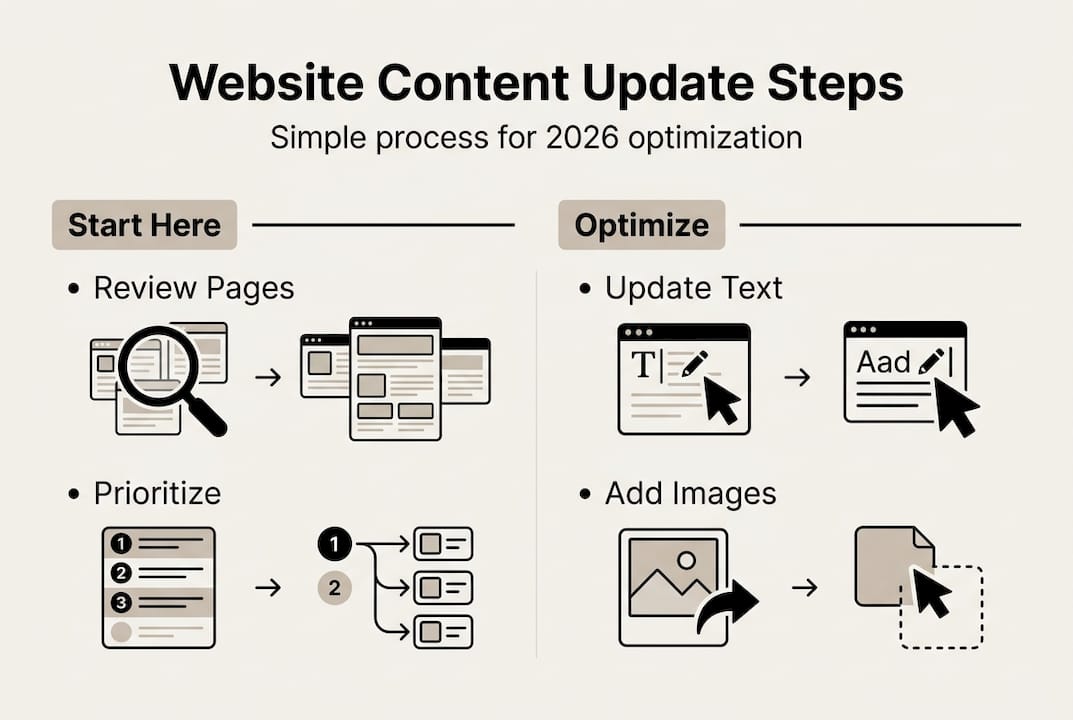
Effective preparation makes the difference between updates that move the needle and wasted effort. Start with a comprehensive content audit. Review every page on your site and categorize content as current, needs minor updates, needs major revision, or should be removed. This inventory reveals exactly where to focus your energy.
Set specific, measurable goals before touching a single page. Are you trying to rank for new keywords? Improve conversion rates on service pages? Reduce bounce rates? Clear objectives guide your decisions about what to update and how. Vague goals like “make the site better” lead to scattered efforts and disappointing results.
Choosing the right tools streamlines the entire process. Most small businesses benefit from:
Pro Tip: Create a simple spreadsheet listing every page, its current status, priority level, and assigned owner. This single document becomes your roadmap and prevents important pages from falling through the cracks.
Using the right content management tools facilitates efficient updates for professional services companies. The investment in proper tools pays for itself through time saved and better results.
Keyword research deserves special attention during preparation. Search behavior evolves constantly. Terms that drove traffic two years ago may have been replaced by new phrases your audience now uses. Tools like Google Keyword Planner, Semrush, or Ahrefs reveal current search volumes and competition levels. Target keywords with decent search volume but manageable competition.
Timing matters more than most business owners realize. Avoid updating your entire site at once. Stagger changes over several weeks to monitor impact and catch problems before they multiply. If you’re working with a team, clearly assign responsibilities and deadlines. Ambiguity about who updates what creates delays and inconsistent quality.
| Preparation task | Time required | Priority level |
|---|---|---|
| Complete content audit | 2-4 hours | High |
| Set specific goals | 30 minutes | High |
| Research target keywords | 2-3 hours | High |
| Select and configure tools | 1-2 hours | Medium |
| Create update schedule | 30 minutes | Medium |
Consider whether you’ll handle updates internally or partner with a service provider. Websites archives show options for businesses that need professional support. The right choice depends on your technical comfort level, available time, and budget constraints.
Begin with your highest-priority pages, typically your homepage, main service pages, and top-performing blog posts. These pages drive the most traffic and conversions, so improvements here deliver maximum impact. Open each page in your content management system and work methodically through these steps.

Update text content with current information and optimized keywords. Replace outdated statistics, revise service descriptions to reflect current offerings, and strengthen calls to action. Every page should clearly tell visitors what to do next, whether that’s requesting a quote, scheduling a consultation, or downloading a resource. Weak or missing calls to action are conversion killers.
Enhance multimedia elements to boost engagement and page performance. Compress images to improve load speed without sacrificing quality. Add descriptive alt text to every image for SEO and accessibility. Update or add videos if they support your message. Visual content increases time on page and helps visitors understand complex services.
Test technical performance after content changes. Use Google PageSpeed Insights or GTmetrix to verify your updates didn’t slow down page load times. Check mobile responsiveness on actual devices, not just desktop browser simulators. Over 60% of web traffic comes from mobile devices in 2026. A page that looks perfect on desktop but breaks on mobile wastes your update effort.
Follow this execution checklist to maintain quality:
Pro Tip: Use a staging environment if your hosting supports it. This lets you test changes without affecting your live site. Catch formatting issues, broken links, and other problems before visitors see them.
Deciding between manual updates and professional services depends on your situation. This comparison helps clarify the best approach:
| Factor | Manual updates | Professional service |
|---|---|---|
| Cost | Time investment only | Monthly fee or project rate |
| Speed | Depends on your availability | Faster with dedicated resources |
| Quality | Limited by your expertise | Professional optimization |
| Ongoing maintenance | Requires consistent discipline | Handled systematically |
| Best for | Simple sites, tight budgets | Complex sites, busy owners |
For businesses that want expert execution without the learning curve, optimizing existing content through a managed service eliminates guesswork and accelerates results. The key is matching your approach to your resources and goals.
Document your changes as you work. Note what you updated, when, and why. This record helps you track what works and informs future updates. It also prevents duplicate effort if multiple people manage your site.
Neglecting SEO best practices during updates undermines your efforts. Business owners sometimes focus solely on making content “sound better” while ignoring keyword placement, meta descriptions, and internal linking. Every update is an opportunity to strengthen SEO signals. Miss that opportunity and you’re leaving easy wins on the table.
Skipping content proofreading and testing creates embarrassing problems. Typos, broken formatting, and non-functional links damage credibility. Visitors question whether you’re detail-oriented enough to serve them well. Always preview changes in multiple browsers and devices before considering an update complete. Have someone else review important pages with fresh eyes.
Not tracking update results leads to repeated mistakes and missed improvements. You can’t optimize what you don’t measure. Set up Google Analytics goals to track conversions from updated pages. Monitor rankings for target keywords. Compare traffic levels before and after updates. This data reveals what’s working and what needs adjustment.
“The biggest mistake isn’t making imperfect updates. It’s not updating at all because you’re waiting for perfect conditions that never arrive.”
Updating too infrequently or too much at once both create problems. Long gaps between updates let your site grow stale and rankings decline. Massive simultaneous changes make it impossible to isolate what drove results or caused issues. Establish a sustainable rhythm that keeps content fresh without overwhelming your capacity.
Failing to maintain consistent brand voice and messaging confuses visitors. If your homepage sounds professional and polished but your blog posts read like they’re from a different company, you’ve got a credibility problem. Define your brand voice and ensure all content updates align with it. Consistency builds trust and recognition.
Common pitfalls to actively avoid:
Avoiding common content update mistakes ensures sustained SEO performance and user trust. Learn from others’ errors instead of repeating them. The most successful businesses treat content updates as an ongoing discipline, not a one-time project.
Many business owners also underestimate the importance of internal linking. Each updated page should link to related content on your site. This helps visitors discover more of your expertise and distributes SEO value across your site. Review website content examples to see how strategic linking supports both user experience and search performance.
Use analytics tools to monitor traffic and conversion changes after updates. Google Analytics shows you exactly which pages improved and which need more work. Look for increases in organic traffic, time on page, and conversion rates. Compare performance to the 30 days before your updates to establish clear baselines.
Solicit client feedback on website usability and content relevance. Direct user input reveals problems analytics can’t capture. Send a brief survey to recent customers asking about their website experience. Monitor support inquiries to see if updated content reduces confusion. User feedback often highlights quick wins you’d otherwise miss.
Schedule regular update intervals to keep content fresh without overwhelming your schedule. Most small businesses benefit from:
Adjust SEO strategies based on performance data. If certain keywords aren’t driving the expected traffic, research alternatives. If specific pages convert exceptionally well, analyze what makes them effective and apply those lessons elsewhere. Tracking website performance after content updates helps maintain and improve lead generation and SEO outcomes.
Plan for incremental content expansion and refinement. Your first update won’t be perfect. That’s fine. Each round of updates should build on previous improvements. Add new service pages as your business grows. Expand thin content that’s underperforming. Remove or consolidate pages that no longer serve your goals.
Key metrics to track consistently:
Set up automated reports so you’re not manually checking analytics constantly. Monthly summaries keep you informed without becoming a time sink. When you spot concerning trends, investigate promptly instead of waiting for your next scheduled review.
The most effective content strategies evolve continuously. What works today may need adjustment in six months as search algorithms change, competitors improve, and user expectations shift. Build flexibility into your process. Stay informed about SEO best practices and industry trends. Your willingness to adapt determines long-term success.
Updating website content efficiently requires expertise, tools, and consistent execution. That’s exactly what MonsterWP delivers. Our fully managed WordPress platform handles everything from initial content optimization to ongoing updates, so you can focus on running your business instead of wrestling with your website.
We offer affordable custom websites built specifically for small to mid-sized businesses. Every site includes unlimited content updates and rapid revisions as part of your monthly plan. No per-change fees. No waiting weeks for simple updates. Just fast execution that keeps your site current and competitive.

Beyond website management, our digital marketing services complement your content strategy with SEO optimization, social media management, and paid advertising. We combine these services into a complete growth system designed to increase visibility and generate qualified leads. Learn more about how MonsterWP works and why businesses choose us over traditional agencies.
Aim to update key pages at least quarterly and blog content monthly to stay relevant and boost SEO. High-priority pages like your homepage and main service pages benefit from more frequent attention, especially if your industry changes rapidly. Adjust your schedule based on competitive pressure and available resources, but never let more than three months pass without reviewing your most important content.
Many user-friendly tools and services enable non-technical owners to update content successfully. WordPress and similar platforms provide intuitive editors that work like word processors. However, optimizing existing content for SEO and conversions requires expertise most business owners don’t have time to develop. Professional services handle the technical complexity while you focus on strategy and business goals.
Content management systems like WordPress are popular and versatile for businesses of all sizes. Pair your CMS with Google Analytics for performance tracking, a keyword research tool like Semrush, and project management software to coordinate updates. Digital marketing tools help analyze and optimize content efficiently, especially when integrated into a managed service that handles implementation for you.
Most businesses notice initial improvements within two to four weeks as search engines recrawl updated pages. Significant ranking changes typically take two to three months as your site builds authority for target keywords. Conversion improvements from better calls to action and clearer messaging often appear faster, sometimes within days of publishing updates. Patience and consistent measurement help you understand your specific timeline.
Update existing posts whenever possible rather than removing them. Old posts that still drive traffic represent valuable SEO assets. Refresh outdated statistics, add new sections covering recent developments, and improve keyword optimization. Only remove posts that cover discontinued services, contain seriously outdated information that can’t be salvaged, or attract traffic but never convert visitors. When you must remove pages, implement 301 redirects to preserve SEO value.
Learn actionable local SEO steps to boost your small business visibility, attract qualified leads, and rank higher without hiring an agency.

Learn how strategic website updates drive marketing growth and qualified leads. Get a proven framework for prioritizing updates that maximize your ROI in 2026.