
Top 3 GoDaddy.com Hosting Alternatives 2026
Explore the top 3 GoDaddy.com alternatives for reliable hosting solutions. Compare to make an informed decision for your business needs.


TL;DR:
- Website speed directly impacts search rankings, user experience, and conversion rates, especially on crucial pages.
- Focusing on Core Web Vitals like LCP, INP, and CLS, using real user data, ensures improvements reflect actual visitor experiences.
Content might be king, but a slow website is a silent killer. You could have the best blog posts, the sharpest service pages, and a rock-solid brand, yet still lose customers to a competitor whose site loads two seconds faster. Google has made it clear: speed matters for rankings. More importantly, it matters to the real humans clicking through to your site. If your pages drag, visitors bounce, leads evaporate, and your rankings slide. This guide breaks down exactly why site speed is a critical SEO factor, how Google measures it, and what you can do right now to fix it.
| Point | Details |
|---|---|
| Speed impacts rankings | Faster websites have a direct edge in Google results, especially when competing content is strong. |
| Field data matters most | Google ranks sites using real-user field data, not only lab tests. |
| Focus on high-value pages | Prioritize fixing Core Web Vitals on homepages and landing pages first. |
| Speed aids conversion | Faster sites don’t just rank better—they turn more visitors into qualified leads. |
| Monitor and iterate regularly | Continual auditing and speed improvement keeps your site ahead of competitors. |
Google’s core mission is to serve users the best possible results, and that means fast, reliable, and helpful pages. A page that takes seven seconds to load is not a good result, no matter how great the content is. Google recognized this years ago and has been building speed signals into its ranking algorithm ever since.
The most important speed signals Google uses today are called Core Web Vitals. These are specific measurements of how real users experience your page’s loading, responsiveness, and visual stability. Google’s ranking systems use Core Web Vitals as part of page experience signals for SEO, which means they directly influence where your pages show up in search results.
Here is what makes this particularly important for small and mid-sized business owners:
“A page that’s slow to load is a poor experience regardless of how good the content is. Google factors this reality into rankings.”
Think of it this way: Google is your toughest customer. It visits your site, measures how fast it loads, and decides whether you deserve to be recommended. Pair that with solid technical SEO tips and you have a real competitive edge.
Now that you understand Google’s motives, let’s see how website speed is actually measured and what metrics to prioritize.
Core Web Vitals are three specific signals Google uses to evaluate page experience. Each one targets a different dimension of how users interact with your site:
| Metric | What it measures | Good score |
|---|---|---|
| LCP (Largest Contentful Paint) | How fast the main content loads | Under 2.5 seconds |
| INP (Interaction to Next Paint) | How fast the page responds to clicks | Under 200 milliseconds |
| CLS (Cumulative Layout Shift) | How stable the layout is while loading | Under 0.1 |
Core Web Vitals consist of LCP, INP, and CLS as the three metrics covering loading, responsiveness, and visual stability. Each one maps directly to a frustration real users feel: waiting for content, tapping a button that doesn’t respond, or having text jump around as images load.
What makes this system powerful is that Google uses CrUX field data to measure experience metrics for real users. CrUX stands for Chrome User Experience Report. It collects anonymous performance data from actual Chrome users visiting your site. That data, not a simulated test in a lab, is what feeds into Google’s ranking signals.
The business implication here is significant. You can score a perfect 100 in a Lighthouse test (a popular lab tool) and still have poor field data because your real visitors are on slow mobile networks or older devices. Lab scores are useful for diagnosing problems. Field data is what actually counts.
Failing Core Web Vitals on your most valuable pages, like your homepage, service pages, or contact page, means the pages driving the most revenue are also the ones hurting your rankings the most. That’s a double loss you cannot afford.
For deeper insights into how performance metrics drive business outcomes, Core Web Vitals for professionals is worth your time. You can also explore business intelligence insights to see how web performance fits into a broader growth strategy.
Pro Tip: Focus your first round of fixes on your homepage and highest-intent landing pages. These are the pages doing the heaviest lifting for leads and sales. Fix them first, retest with real field data, and then work outward from there.
After seeing the nuts and bolts of site speed, let’s get specific: does faster really mean better business outcomes for your site?
The answer is yes, with one important caveat. Speed is not a magic shortcut past poor content or weak authority. It is a powerful tiebreaker. When two pages are competing for the same keyword and their content quality is roughly equal, the faster page wins more often. Speed alone won’t necessarily drive top rankings since it functions primarily as a tiebreaker among competitors with similar content. But in practice, most local business competitors are not running optimized sites, which means speed gains translate directly into ranking improvements.
The conversion impact is even more concrete. Walmart and Mozilla saw measurable conversion improvements with faster load times, with Walmart reporting a 2% increase in conversions for every one second of improvement. Mozilla saw 15% more downloads after shaving 2.2 seconds from their page load time. These are real dollar gains tied directly to speed.

Here is a practical comparison of what slow versus fast websites produce:
| Factor | Slow website (3+ seconds) | Fast website (under 2 seconds) |
|---|---|---|
| Bounce rate | High (up to 90% for 5+ second loads) | Low (under 40% typically) |
| Google ranking | Penalized in competitive searches | Favored in page experience signals |
| Conversion rate | Loses 7% per second of delay | Captures more leads and sales |
| User trust | Eroded by frustrating experience | Built through smooth, reliable UX |
For small businesses, the math is straightforward. If your site takes five seconds to load and you fix it to under two seconds, you could see double-digit percentage improvements in leads from the same traffic volume.
Here is where to focus your speed improvement efforts for maximum business impact:
Explore real-world conversion case studies to see how speed improvements translate into leads, and check out client testimonials for firsthand accounts of performance gains in action.
With the clear impact established, it’s time to act. Here is how to identify and correct slowdowns right now.
Step 1: Audit your current performance. Use Google’s PageSpeed Insights to get both lab diagnostics and a window into field data. The Core Web Vitals section at the top of the report shows real-user scores if your site has enough traffic in CrUX. Start here before touching anything.
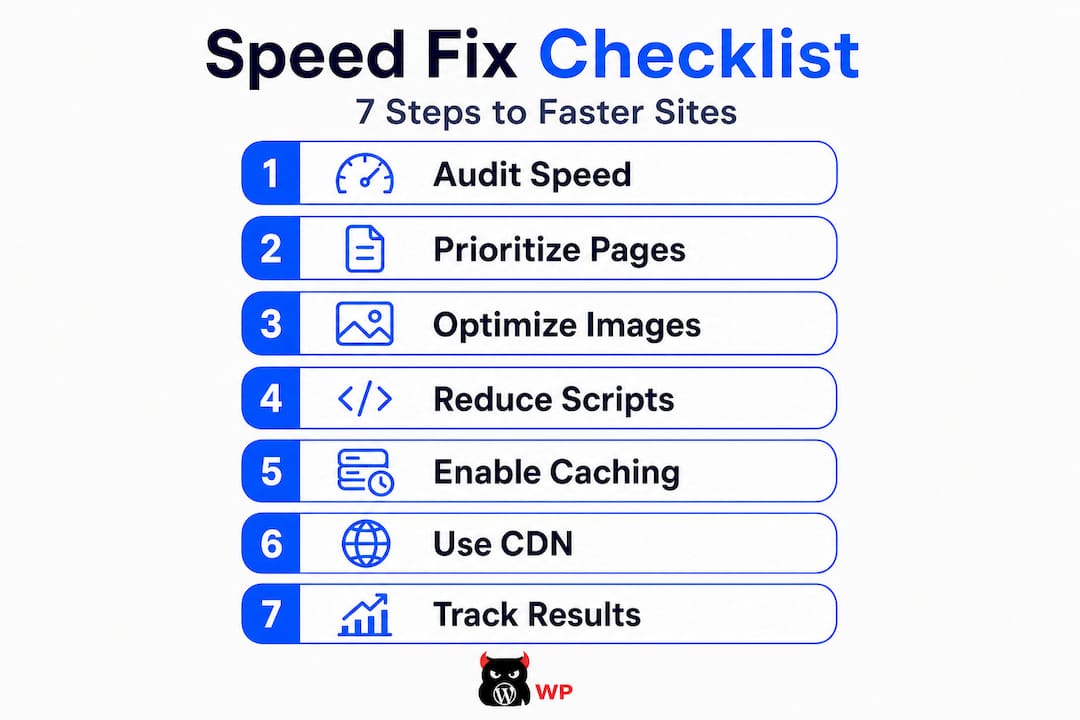
Step 2: Prioritize your most valuable pages. Do not try to fix everything at once. Rank your pages by business value (home, services, key landing pages) and fix the top five first. This gives you the fastest return on your effort.
Step 3: Optimize images. Oversized, uncompressed images are the single most common cause of slow LCP scores. Convert images to WebP format, compress them before uploading, and use lazy loading for images below the fold.
Step 4: Reduce render-blocking scripts. JavaScript and CSS files that load before your page content block the browser from showing anything. Defer non-essential scripts and minify your CSS to cut bloat.
Step 5: Enable caching. Caching stores a version of your page so returning visitors and even first-time visitors on fast connections get nearly instant loads. Most WordPress caching plugins handle this without needing a developer.
Step 6: Use a content delivery network (CDN). A CDN stores copies of your site on servers around the country (or world), so visitors always load from a server close to them. This alone can cut load times significantly for geographically spread audiences.
Step 7: Track and retest. Speed improvements are not a one-and-done task. Run monthly audits and review field data consistently.
Remember, field performance indicators matter more than chasing a PageSpeed number alone. Lab diagnostics tell you what to fix. Field data tells you if the fix actually worked for real users.
Dig deeper with our website optimization steps guide and review the SEO ranking factors that matter most for small businesses this year.
Pro Tip: After implementing fixes, wait two to four weeks before judging field data improvements. CrUX data is collected over a 28-day rolling window, so you need time for real-user data to refresh before the results show.
To finish, let’s separate fact from fiction and outline a simple roadmap you can start on today.
Myth #1: “My Lighthouse score is 90, so I’m good.” A high lab score does not guarantee good field performance. A site can look “fast” in lab tools but still fail field data, since Google relies on real-user results. Always cross-check your lab scores against CrUX field data in Search Console.
Myth #2: “Fixing speed everywhere will boost my rankings.” Sitewide fixes sound appealing, but scattered small improvements rarely move rankings. Focus where your competition is strongest and your intent is highest. A marginal speed boost on a low-traffic blog post is not worth the same as a two-second improvement on your homepage.
Myth #3: “Speed is only a mobile issue.” Speed matters on desktop too, but mobile is where most small business searches happen. Google’s mobile-first indexing means your mobile speed score carries more weight in rankings than your desktop score.
Myth #4: “One fix will solve everything.” Speed is a combination of hosting quality, image optimization, code efficiency, caching, and CDN delivery. No single change fixes everything.
Here is your action checklist:
For local businesses, speed is especially critical for map pack rankings and local organic results. Read our local SEO impact guide to see how performance and local SEO work together.
Pro Tip: Set up Google Search Console’s Core Web Vitals report and check it monthly. It groups your pages into “Poor,” “Needs improvement,” and “Good” categories using real field data, making prioritization easy without any technical knowledge.
Most SEO guides about site speed focus on one thing: chasing a perfect Lighthouse score. We understand why. It’s a clean number. It feels good to hit 100. But it is often a distraction.
Here is the uncomfortable truth. We have seen clients with Lighthouse scores in the 90s still struggling with poor Core Web Vitals field data because their actual visitors were on congested mobile networks or budget Android phones. The lab was lying to them, and they were optimizing for the lie.
Our best results, for clients across industries, have come from a different approach. We pull the CrUX field data first. We identify which money pages are failing in the real world. Then we fix those pages specifically, with a focus on LCP and INP since those two have the most direct impact on both rankings and conversion behavior.
Speed is powerful. But it is only one part of a winning strategy. We have never seen a fast, ugly, or unhelpful page outrank a well-built competitor long-term. Speed paired with strong content, clean UX, and strategic on-page SEO is where real results happen. That combination is what we build into every site we launch.
The other thing most guides miss: it is far better to perfect three critical pages than to scatter fixes across thirty. Revenue follows focus. One fast, well-optimized landing page that ranks and converts beats a sitewide average boost that produces nothing measurable.
See how this approach worked in practice with our case study on a fast landing page rebuild that produced real ranking and conversion gains.
Choose your fixes by revenue impact, not by Google scores. That mindset shift is what separates businesses that grow from ones that stay stuck tweaking numbers that don’t pay the bills.
Your website should work as hard as you do. If slow load times and weak Core Web Vitals are quietly costing you leads and rankings, it’s time to stop guessing and start fixing.

At MonsterWP, we build custom fast websites that are optimized for speed, Core Web Vitals, and SEO from day one. Every site we launch is engineered for performance using Elementor Pro, with caching, CDN, and image optimization built in, not bolted on. We also handle ongoing fixes, content updates, and monthly performance reviews so you never fall behind. Check out our flat fee website plans starting at $299 per month and see how simple it is to get a site that actually performs. No bloated retainers. No guesswork. Just results.
LCP, INP, and CLS are the three Core Web Vitals that directly affect user experience and Google rankings, covering loading speed, responsiveness, and layout stability respectively.
Google uses CrUX field data from real Chrome users to track how fast visitors actually experience your site, which is distinct from simulated lab tests.
Yes. Slow loading speed can lower your local search ranking, especially when speed becomes a tiebreaker among local competitors with similar content and authority.
Prioritize field data. Google relies on real-user results from CrUX for rankings, so real-world performance is what drives your actual position in search, not lab benchmarks.
Check your site speed monthly using Google Search Console’s Core Web Vitals report, and always recheck after major updates, redesigns, or new plugin installations to catch any regressions early.
Explore the top 3 GoDaddy.com alternatives for reliable hosting solutions. Compare to make an informed decision for your business needs.

Unlock the power of content optimization strategies that drive results. Discover how to enhance rankings, leads, and revenue effectively!