
Website scalability: how to future-proof your online growth
Learn how website scalability works, which strategies protect your revenue, and how to future-proof your site before your next traffic spike or campaign launch.


TL;DR:
- High-performance hosting delivers measurable results in key metrics like TTFB under 200ms and LCP below 1.5 seconds.
- Speed and reliability directly impact SEO, conversions, brand trust, and revenue growth.
- Choose hosts based on real benchmarks, resource isolation, infrastructure quality, and support rather than marketing claims.
Most business owners assume their website is “fast enough.” It isn’t. A single second of load delay can slash conversions by up to 7%, and the gap between a mediocre host and a truly high-performance one is measurable in real dollars lost. Empirical benchmarks show top providers achieving TTFB as low as 128ms globally, LCP under 1.5 seconds, and CLS below 0.05. These aren’t vanity metrics. They’re the engine behind your rankings, your revenue, and your reputation. This guide breaks down what high-performance web hosting actually means, how to measure it, and exactly what to look for before you commit to a provider.
| Point | Details |
|---|---|
| Performance metrics matter | Choose hosting with proven TTFB, LCP, INP, and CLS scores for real speed. |
| Boost growth via hosting | High-performance hosting improves search rankings, user experience, and conversion rates. |
| Features drive real value | Evaluate resource isolation, hardware, caching, and support before choosing a host. |
| Smart selection checklist | Use a feature checklist and clear requirements to pick hosting that aligns with your business growth. |
Not all hosting is created equal. Marketing copy loves words like “blazing fast” and “enterprise-grade,” but those phrases mean nothing without numbers to back them up. High-performance web hosting is defined by its ability to consistently deliver measurable results across four core metrics that Google and your users actually care about.
Here’s what those metrics mean and what you should expect from a serious provider:
| Metric | What it measures | Optimal target |
|---|---|---|
| TTFB (Time to First Byte) | Server response time | Under 200ms |
| LCP (Largest Contentful Paint) | Perceived load speed | Under 1.5 seconds |
| INP (Interaction to Next Paint) | Responsiveness to user input | Under 60ms |
| CLS (Cumulative Layout Shift) | Visual stability during load | Under 0.05 |
These are Google’s Core Web Vitals, and they’re not optional if you care about search rankings. Real-world performance benchmarks show top-tier providers like Vultr HF hitting 128ms TTFB and Kinsta averaging 182ms with a standard deviation of just 28ms, meaning consistency matters as much as raw speed.
Beyond speed, high-performance hosting rests on three pillars:
Here’s the myth worth busting: a premium price tag does not guarantee premium performance. Some of the most aggressively marketed hosts in the industry deliver mediocre TTFB and inconsistent uptime. Understanding what makes hosting high-performance means looking past the branding and demanding real benchmark data before you sign up.
The bottom line is simple. Your host is the foundation everything else is built on. A weak foundation means slower pages, lower rankings, and frustrated visitors who leave before they convert.
Now that you know how to identify high-performance hosting, it’s key to see how these technical advantages convert into real business outcomes. Speed isn’t a feature. It’s a growth lever.
SEO rankings improve with faster hosting. Google officially uses Core Web Vitals as ranking signals. Faster hosting metrics like TTFB and LCP directly support higher search rankings and better user engagement. If your competitor’s site loads in 1.2 seconds and yours takes 3.5 seconds, they’re winning on search before a single word of content is even compared.

Conversions rise when friction disappears. Every 100ms of delay costs real revenue. Visitors don’t wait. They bounce. A site that loads instantly creates a frictionless experience that keeps users engaged and moving toward a purchase or inquiry. That’s the difference between a digital brochure and a lead-generating machine.
Here’s what performance hosting directly impacts for your business:
Uptime builds trust you can’t buy with marketing. A site that goes down during a product launch or a busy Monday morning sends one message: we’re not ready for your business. Choose a host that commits to uptime SLAs and provides transparent reporting, not just promises buried in fine print.
“Performance hosting is the backbone of online revenue growth.”
Pro Tip: Before committing to any host, ask for their uptime report from the past 12 months and their average TTFB from a third-party benchmark. Any reputable provider will have this data ready. If they don’t, that’s your answer.
A fast, SEO-ready website isn’t a luxury for enterprise brands. It’s the baseline expectation for any business serious about growing online in 2026.
Understanding the benefits is crucial, but knowing what features deliver these outcomes empowers better hosting decisions. Let’s cut through the noise.
Hosting types vary dramatically in performance potential:
Resource isolation is the single most underrated factor in hosting performance. VPS and dedicated servers outperform shared hosting by eliminating the noisy neighbor problem entirely. And on the server software side, LiteSpeed outperforms Nginx by 15 to 40% lower TTFB and CPU usage in PHP and WordPress workloads. That’s a significant edge.
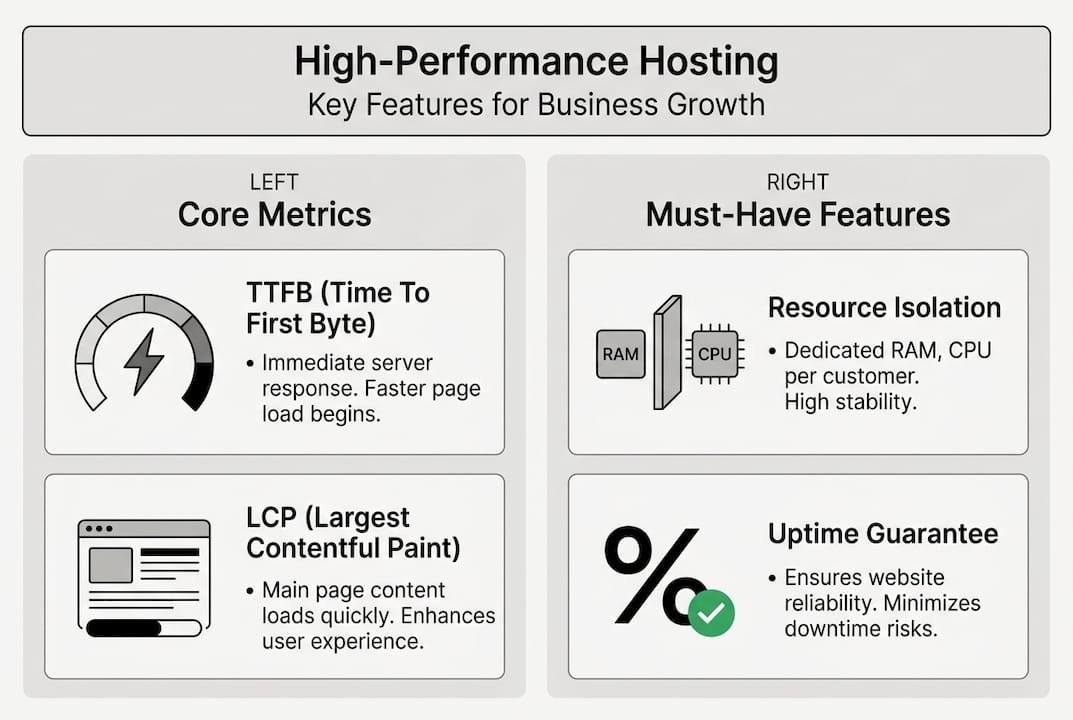
Here’s how modern hosting stacks compare on the features that actually matter:
| Feature | Shared hosting | VPS/Cloud | Managed cloud |
|---|---|---|---|
| Resource isolation | None | Partial to full | Full |
| SSD storage | Sometimes | Usually NVMe | Always NVMe |
| Built-in CDN | Rarely | Optional | Often included |
| Server-level caching | No | Configurable | Included |
| Managed updates | No | No | Yes |
| Support quality | Basic | Variable | Priority |
Pro Tip: Don’t evaluate speed features in isolation. A fast server with poor security is a liability. Prioritize hosts that offer real-time malware scanning, automatic updates, and DDoS protection alongside their speed stack.
If you want to skip the research entirely and get a fully managed custom website built on infrastructure that’s already optimized, that’s a valid path too. For leaner budgets, exploring simple WordPress site hosting options can still deliver strong performance without enterprise-level overhead.
Once you know what features matter, use this checklist to evaluate and select a high-performance host tailored to your business. Switching hosts is not a small decision. Do it right the first time.
Step-by-step evaluation checklist:
Managed cloud hosting balances scalability and ease effectively, but CDNs add complexity, especially around cache misses, which can serve outdated content to users if not configured correctly. Always ask your host how they handle CDN cache invalidation.
Common mistakes to avoid:
A flat-fee WordPress solution removes most of this friction by bundling hosting, management, and support into one predictable monthly cost. For growth-focused businesses, that kind of simplicity has real operational value.
Having built a checklist for evaluating hosts, here’s the hard truth most articles won’t tell you: the hosting decision is almost always made wrong.
Business owners tend to choose hosts based on brand recognition or price, not performance data. They assume the most expensive option is the fastest. It rarely is. We’ve seen sites on premium-priced shared hosts performing worse than sites on mid-tier VPS plans configured correctly. The brand promise and the real performance are often miles apart.
The other mistake is treating downtime as an inconvenience rather than a revenue event. An hour of downtime during peak traffic isn’t just annoying. It’s lost sales, lost ad spend, and damaged trust that takes weeks to rebuild.
Smart businesses treat hosting as a cornerstone investment, not a $10-a-month afterthought. The right question isn’t “what’s the cheapest host that keeps my site online?” It’s “what infrastructure gives my site the best chance of ranking, converting, and scaling?” Use objective benchmarks and real business-case needs to make that call. Marketing claims are noise. Numbers are signal.
You now understand what separates real hosting performance from marketing fluff. The next step is putting that knowledge to work with a platform built to deliver measurable results from day one.

At MonsterWP, we design, launch, host, and manage custom WordPress websites optimized for speed, security, and SEO from the ground up. Every site we build hits the performance benchmarks that matter, because we control the full stack. If you’re ready to stop guessing and start growing, explore our flat-fee WordPress website plans or go further with WordPress hosting with SEO and PPC built into one system. No bloated retainers. No surprises. Just a fast, reliable digital engine that works.
The most important metrics are TTFB, LCP, INP, and CLS. Top-performing hosts hit TTFB under 200ms, LCP under 1.5 seconds, INP under 60ms, and CLS below 0.05.
Faster hosting metrics like TTFB and LCP directly influence Google’s Core Web Vitals rankings, and faster pages reduce bounce rates, which means more visitors convert instead of leaving.
Shared hosting is affordable but slow under load; VPS provides better resource isolation and performance; managed cloud balances scalability and ease with far less technical overhead.
CDNs are essential for serving global audiences quickly, but they add complexity around cache miss handling, so always confirm your host has a clear strategy for managing them.
Learn how website scalability works, which strategies protect your revenue, and how to future-proof your site before your next traffic spike or campaign launch.

Learn actionable local SEO steps to boost your small business visibility, attract qualified leads, and rank higher without hiring an agency.