
What is high-performance web hosting? Key benefits for growth
Discover what high-performance web hosting really means, the metrics that matter, and how the right host drives SEO rankings, conversions, and business growth.


TL;DR:
- Website scalability ensures performance and resilience during traffic spikes and growth.
- Horizontal scaling with load balancers and autoscaling is preferred for fault tolerance and elasticity.
- A business-aligned, incremental approach prevents over-engineering and prepares sites for future demand.
Most business owners pour money into web design and SEO, then watch their site buckle the moment a campaign goes viral or a product launch drives real traffic. A beautiful website means nothing if it collapses under pressure. Scalability is the silent engine behind every high-performing digital business, and most growth guides never mention it until something breaks. In this article, we break down what website scalability actually means, how it works, which strategies protect your revenue, and what pitfalls to avoid. Whether you’re running a local service business or a growing e-commerce brand, this is the foundation your online growth depends on.
| Point | Details |
|---|---|
| Scalability enables growth | A scalable website can handle more traffic and leads without sacrificing performance or user experience. |
| Balance approach and cost | Horizontal scaling offers resilience but requires smart planning to avoid unnecessary expense and complexity. |
| Action beats over-engineering | Focus on identifying bottlenecks and applying practical, proven strategies tailored to your business needs. |
| Avoid common mistakes | Don’t rely solely on autoscaling or technology upgrades—fix inefficiencies before scaling for true efficiency. |
| Iterate for future readiness | Test, review, and adapt your website regularly to ensure it stays flexible as your business grows. |
Let’s get one thing straight: a fast website is not automatically a scalable one. Speed and scalability are related, but they’re not the same thing. Your site might load in under two seconds on a quiet Tuesday, then completely fall apart when 5,000 visitors hit it simultaneously after a paid ad goes live.
Website scalability is the ability of a website’s architecture to handle increased load, including traffic, users, and data, while maintaining performance, availability, and cost efficiency. That’s the core definition, and it’s worth reading twice.
Scalability is not just about handling more visitors. It’s about doing so without degrading the experience, spiking your costs, or creating new failure points.
Scalability is also different from elasticity. Elasticity means your infrastructure automatically adjusts resources in real time. Scalability is the broader design principle that makes that possible. You can learn more about the scalability mechanics behind modern web systems to see how these concepts connect.
For business owners focused on boosting online leads, a scalable website delivers real, measurable advantages:
Think of scalability as the structural integrity of your digital building. You can paint the walls and upgrade the lobby all you want, but if the foundation cracks under weight, none of that matters.
Now that you know what scalability means, let’s explore the main approaches businesses use to achieve it.
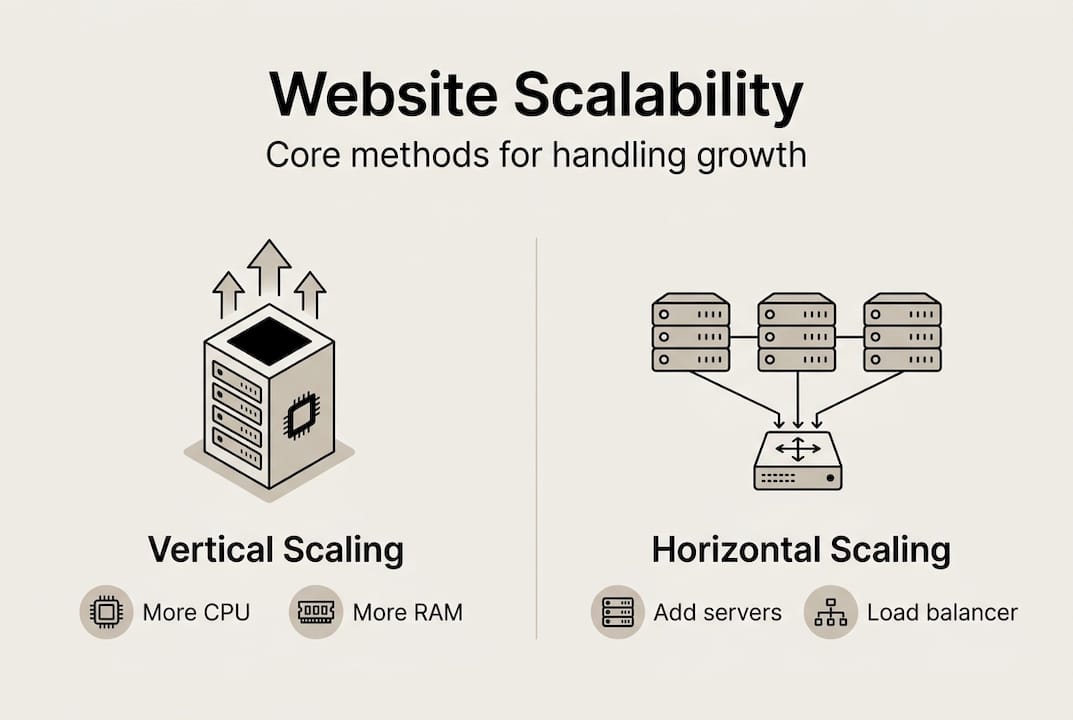
There are two fundamental methods: vertical scaling and horizontal scaling. Both solve the same problem but in very different ways, and each comes with real tradeoffs.
Vertical scaling means upgrading the resources on a single server, such as adding more CPU power, RAM, or storage. It’s quick to implement and relatively cheap in the short term. The downside? There’s a ceiling. Every server has a maximum capacity, and if that server goes down, your entire site goes with it. That’s called a single point of failure, and it’s a serious risk for any growth-focused business.
Horizontal scaling means adding more servers and distributing traffic across them using load balancers. As vertical vs. horizontal scaling comparisons show, horizontal scaling is preferred for websites because it offers fault tolerance and true elasticity. If one server fails, others absorb the load. The tradeoff is greater complexity and higher setup costs.
| Factor | Vertical scaling | Horizontal scaling |
|---|---|---|
| Cost | Lower upfront | Higher setup cost |
| Complexity | Simple | More complex |
| Resilience | Single point of failure | High fault tolerance |
| Best use case | Small sites, quick fixes | Growth-focused platforms |
Real-world triggers that force businesses to scale include:
For businesses investing in high-performance hosting, understanding these triggers helps you plan ahead instead of reacting in crisis mode.
Pro Tip: Never rely solely on vertical scaling for a business-critical website. Once you hit the server ceiling, you have no safety net. Combine both approaches early so you’re not scrambling during your biggest growth moments.
Understanding the options is important, but which strategies will actually help your business handle real-world growth?
The most effective scalability stack combines several proven components. Autoscaling strategies like AWS ECS Fargate and Google Managed Instance Groups, combined with CDNs, caching, stateless design, and database replication, form the backbone of modern scalable web infrastructure.
| Strategy | Primary benefit |
|---|---|
| Content Delivery Network (CDN) | Faster global load times, reduced server strain |
| Caching (cache-aside) | Dramatically reduced database queries |
| Horizontal scaling + load balancing | Resilience and capacity under traffic spikes |
| Autoscaling groups | Cost efficiency, dynamic resource allocation |
| Stateless design | Easier to distribute across multiple servers |
The business case for these investments is not abstract. E-commerce sites that implemented CDN and performance optimizations saw page load times drop from 4.5 seconds to 2.2 seconds, with conversion rates improving 6 to 10 percent. A 0.1-second improvement in mobile speed correlates to an 8.4 percent conversion lift. That’s not a technical win. That’s revenue.

For businesses investing in custom design for leads, these performance gains directly protect the return on every dollar spent on traffic.
Here are quick wins you can act on today:
Pro Tip: Use analytics and monitoring tools to identify your actual bottlenecks before scaling. Adding servers to a site with bloated code or unoptimized queries just scales the problem, not the solution.
Technical strategies matter, but ignoring the risks and tradeoffs can make even the best plans backfire.
One of the most dangerous misconceptions is that autoscaling is a safety net for everything. It isn’t. Autoscaling doesn’t fix slow queries, inefficient code, or non-parallelizable work. It also introduces autoscaling lag, where provisioning new servers can take one to five minutes. During a sudden traffic spike, that delay can be catastrophic.
Other edge cases that catch businesses off guard include the “thundering herd” problem, where a cold cache causes every request to hit the database simultaneously, and database connection exhaustion, where too many concurrent users overwhelm your database before your servers even notice.
Scalability is not the same as performance, and it’s not the same as elasticity. Treating them as interchangeable leads to misaligned investments. As web performance research makes clear, the real work is identifying bottlenecks first, not just throwing more infrastructure at a problem.
The top business risks of poor scalability include:
For businesses relying on web hosting benefits to support their growth, understanding these risks is the difference between a resilient digital engine and a liability.
Over-engineering is also a real trap. Adding microservices, Kubernetes clusters, and complex distributed systems to a site that serves a few thousand visitors a month wastes money and creates maintenance nightmares. Balance cost, complexity, and actual risk before committing to infrastructure overhauls.
Equipped with expert insights, here’s how you can start making your website resilient and scalable for your growth goals.
The key insight from scalability guidance is that there is no silver bullet. A modular monolith can scale to millions of requests per second before microservices are even necessary. The goal is to match your architecture to your actual business stage, not to build for a future that may never arrive. Chaos engineering, which involves simulating traffic spikes and failure scenarios, helps you verify your plans before a real crisis does it for you.
Follow this practical framework:
For high-performance web hosting that supports this kind of growth, the infrastructure decisions you make today directly shape your capacity tomorrow.
Prioritize scaling before major campaigns, product launches, or any period of rapid growth. Waiting until traffic breaks your site is expensive and avoidable. For a deeper technical foundation, web performance best practices offer a rigorous framework for building systems that hold up under real-world pressure.
Pro Tip: Even small businesses benefit from simulated load tests. Most hosting platforms offer tools to stress-test your site. Run one before your next big campaign and you’ll know exactly where the cracks are.
Most scalability advice reads like a DevOps checklist. Add a CDN. Enable caching. Use autoscaling. Done. But that framing misses the point entirely for growth-focused business owners.
The real question isn’t “Is my site technically scalable?” It’s “Does my infrastructure align with my actual business goals and growth timeline?” We’ve seen businesses over-engineer their stack before they have the traffic to justify it, burning budget on complexity instead of investing in the marketing and content that would actually drive that traffic.
The smarter approach is iterative. Start with solid business-led design and proven infrastructure. Set clear service-level objectives so you know what “good enough” actually looks like at your current stage. Then scale incrementally as real demand requires it.
Chasing the latest technology is another trap. Proven, maintainable solutions consistently outperform cutting-edge complexity that your team can’t support. Scalability should reduce your operational risk, not multiply it. Build for where you are, plan for where you’re going, and resist the urge to over-engineer before the growth arrives.
Ready to take the next step in future-proofing your digital presence? A scalable website isn’t a luxury for enterprise brands. It’s the foundation every growth-focused business needs before the next campaign, launch, or traffic surge hits.

At MonsterWP, we build and fully manage custom WordPress websites engineered for speed, security, and scalability from day one. Whether you want a flat fee WordPress site with no surprises or a complete WordPress + SEO and PPC package that drives qualified leads, we handle the infrastructure so you can focus on growing your business. No bloated retainers. No technical headaches. Just a digital engine built to scale with you.
No, scalability matters for any business expecting growth or sudden traffic surges, including small service providers running local ad campaigns.
Scalability is the design capacity to handle growth over time, while elasticity auto-adjusts resources in real time to match current demand.
Watch for slower load times during high-traffic periods, increased error rates, or delayed responses. Legacy platforms commonly show p95 load times of 8 to 15 seconds before optimization, a clear signal that scaling is overdue.
The biggest mistake is scaling infrastructure without fixing underlying code problems. Autoscaling won’t resolve slow queries or inefficient logic, it just runs them on more servers.
It depends on your architecture. A modular monolith can handle millions of requests per second before requiring a more complex distributed system redesign.
Discover what high-performance web hosting really means, the metrics that matter, and how the right host drives SEO rankings, conversions, and business growth.

Learn actionable local SEO steps to boost your small business visibility, attract qualified leads, and rank higher without hiring an agency.