
2026 Digital Marketing Trends Guide for Growth
Unlock the future with our 2026 digital marketing trends guide. Discover AI personalization, GEO, and more strategies for lasting growth!


TL;DR:
- Effective Google ranking requires ongoing SEO workflows focused on crawlability, content quality, and technical structure. Small businesses must ensure proper crawl access, optimize on-page elements, and continually monitor performance to maintain and improve rankings. Coordinating these layers prevents hidden issues from eroding visibility and drives sustainable search success.
Google ranking step by step is a structured SEO workflow that moves your website from invisible to indexed, from indexed to competitive, and from competitive to converting. The industry term for this process is search engine optimization, and it is not a one-time task. It is an ongoing system built on crawlability, content quality, technical structure, and performance monitoring. Google Search Console, lean HTML architecture, and keyword-aligned content are the core instruments. Most small business owners underestimate how many layers sit between “I have a website” and “I rank on page one.” This guide exposes those layers.
Crawlability is the foundation of every Google ranking workflow. If Googlebot cannot access your pages, nothing else matters. Not your content, not your backlinks, not your meta titles. The crawl comes first.
Googlebot stops fetching at 2MB of HTML per URL, including HTTP headers. Anything beyond that cutoff is ignored for indexing purposes. That means a bloated page loaded with inline scripts, oversized CSS blocks, and embedded tracking code can push your most important SEO signals past the point where Google ever reads them.
The fix is structural, not cosmetic. Move heavy scripts and stylesheets to external files. Place your meta tags, canonical tags, and structured data near the top of the HTML document. Critical SEO elements placed higher in the page structure have a significantly better chance of being processed before Googlebot hits its limit.
Common crawlability killers include:
Pro Tip: Use Google Search Console’s URL Inspection tool to check whether a specific page is indexed and how Googlebot last rendered it. This is the fastest way to confirm your crawl setup is working before you invest time in content.
Server speed also affects crawl frequency. A slow server signals to Google that your site is unreliable, which reduces how often Googlebot visits. For small businesses on shared hosting, this is a silent ranking suppressor that rarely shows up as an obvious error. Understanding the full scope of technical SEO fundamentals reveals just how many of these issues operate below the surface.
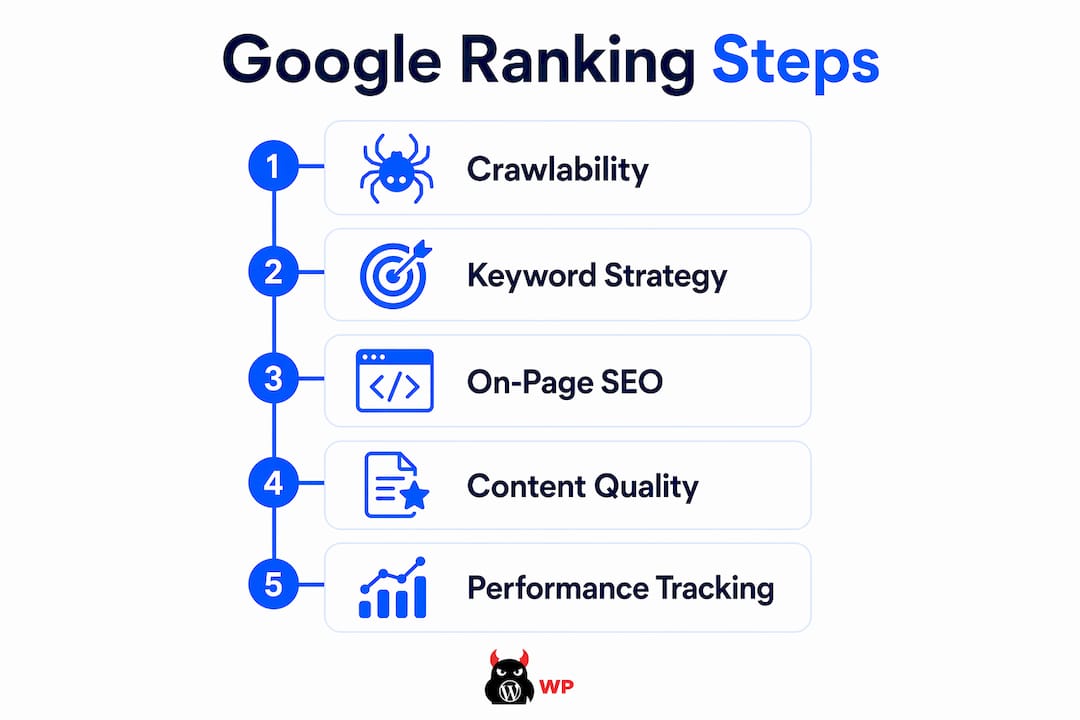
Content is where most small business owners focus first. It is actually the second layer, not the first. But once your crawlability is confirmed, content quality becomes the primary ranking lever.
Foundational SEO still matters under Google’s generative AI-based ranking systems. The shift to AI-powered search has not replaced classic quality signals. It has amplified them. Google’s systems reward pages that genuinely answer a specific question better than any competing page does.
Keyword strategy starts with intent, not volume. A local plumber ranking for “emergency pipe repair Austin” will generate more revenue than ranking for “plumbing tips,” even if the second term gets ten times the monthly searches. Match your content to what your customer is actually trying to accomplish, not just what they type.
Equally important is what to avoid. Google explicitly states that tactics like content chunking, llms.txt files, and AI-only rewrites do not reliably improve ranking. Google’s systems understand full page context. Gimmicks designed to game AI search features are unnecessary and can dilute content quality.
Strong content strategy for small businesses includes:
Pro Tip: Before writing a new page, search your target keyword in Google and read the top three results. Your page needs to answer the same question more completely, more specifically, or for a more defined audience. Generic content does not displace existing rankings.
On-page SEO is the layer where structure meets content. It is where Google reads your signals and decides what your page is about, who it serves, and how authoritative it is relative to competing pages.
Here are the core on-page elements ranked by impact:
| On-page element | Impact on ranking |
|---|---|
| Meta title with keyword | Direct ranking signal, high impact |
| Structured data / schema | Enhances indexing clarity and rich results |
| Internal linking structure | Improves crawl depth and authority flow |
| Mobile page speed | Core Web Vitals affect ranking directly |
| Canonical tags | Prevents duplicate content from splitting ranking signals |
Duplicate content is a structural trap many small business sites fall into without realizing it. Product pages with URL parameters, printer-friendly versions, and paginated archives can all create duplicate signals that dilute your ranking power. Canonical tags resolve this, but only when configured correctly.
Measurement is where most DIY SEO efforts collapse. Without a feedback loop, you are optimizing blind. Google Search Console is the primary tool for tracking ranking progress, and it is free.
The Performance report inside Search Console shows four core metrics: clicks, impressions, click-through rate (CTR), and average position. Average position is a blended, impression-weighted metric and should always be segmented for accurate analysis. A single average position number across your entire site tells you almost nothing useful.
The highest-value insight in Search Console is pages with high impressions but low CTR. These pages already rank, meaning Google considers them relevant, but users are not clicking. The fix is usually a more compelling meta title or description, not more content. This is one of the fastest ways to improve Google ranking without publishing anything new.
Segmenting performance data by device, country, and query prevents false conclusions. A page that appears to rank at position 8 on average might rank at position 3 on desktop and position 14 on mobile. Those two situations require completely different responses.
Pro Tip: Track average position as a 28-day trend, not a daily spot-check. Daily rankings fluctuate based on personalization, location, and algorithm tests. A 28-day view reveals whether your trajectory is genuinely improving or just noisy.
Automated rank tracking workflows using tools like SerpAPI and Google Sheets allow small teams to log ranking data consistently without manual effort. This matters because treating SEO as an iterative process is the only approach that produces lasting results. Monitor, fix, refresh, remeasure. Repeat.
The most expensive SEO mistake is treating it as a one-time project. A business that optimizes its site in January and checks back in December will almost always find its rankings have eroded. Google’s index is dynamic. Your competitors are not standing still.
Most ranking problems originate in crawlability and indexing structure before they ever become content problems. A business owner who spends three months writing new blog posts while their robots.txt is blocking key pages has wasted three months. Diagnose crawl issues first. Always.
Other common mistakes that quietly destroy ranking progress:
“The biggest SEO mistake isn’t doing the wrong thing. It’s doing the right things in the wrong order.”
Skipping the technical audit and jumping straight to content is the most common version of this error. Fix what Google cannot read before you write what you want Google to rank.
A structured Google ranking workflow built on crawlability, on-page optimization, quality content, and continuous Search Console monitoring is the only reliable path to sustained search visibility.
| Point | Details |
|---|---|
| Crawlability comes first | Googlebot’s 2MB fetch limit means bloated pages can hide your most important SEO signals. |
| Content must match intent | Keyword volume matters less than relevance to the specific problem your audience is solving. |
| On-page structure signals matter | Meta titles, schema markup, and internal links directly shape how Google indexes and ranks your pages. |
| Measure with segmented data | Use Search Console’s 28-day trend view, segmented by device and query, to make accurate optimization decisions. |
| SEO is an iterative system | One-time fixes erode. Monitor, fix, refresh, and remeasure on a continuous cycle to hold and improve rankings. |
I have seen hundreds of small business websites that look fine on the surface and are quietly invisible to Google underneath. The owner has no idea. There are no error messages, no warnings, no obvious signs. The site just does not rank.
The hidden complexity is real. A misconfigured canonical tag, a staging noindex directive that was never removed, a server that times out under load, a mobile page that fails Core Web Vitals by 200 milliseconds. None of these show up in your analytics as “SEO problem.” They just show up as no traffic.
What makes this genuinely difficult for small business owners is not the individual tasks. It is the coordination. Crawlability, content, architecture, speed, monitoring, and iteration all have to work together. Letting one layer slip degrades the others. And most founders do not have the bandwidth to audit all of it consistently while running a business.
DIY SEO is not impossible. But the operational cost is higher than most people budget for. The time spent diagnosing a crawl issue, refreshing underperforming content, or interpreting Search Console data is time not spent on sales, operations, or growth. That trade-off is worth naming honestly. For more on how SEO drives business growth when it is managed properly, the pattern is consistent: businesses that treat SEO as infrastructure, not a project, win.
— Vector

MonsterWP builds and manages WordPress websites that are optimized for Google from the ground up. Every site we launch includes lean, crawlable HTML architecture, structured data, mobile performance optimization, and SEO configuration built in from day one. No retrofitting. No guesswork. No bloated retainers.
We handle the technical infrastructure so you can focus on running your business. Our custom WordPress websites start at $299 per month and include unlimited content updates, fast revisions, and managed SEO services that keep your rankings moving in the right direction. Clear pricing. Fast execution. Measurable results.
The first step is confirming that Googlebot can crawl and index your pages. Check your robots.txt file, canonical tags, and URL Inspection data in Google Search Console before making any content changes.
Most new pages take three to six months to reach stable rankings, depending on domain authority, competition, and content quality. Existing pages with impressions but low CTR can show improvement within weeks of optimization.
AI-generated content does not automatically hurt rankings, but thin, generic AI rewrites do. Google rewards pages that genuinely answer a specific question better than competing pages, regardless of how the content was produced.
Filter the Performance report by query and page, then track average position as a 28-day trend segmented by device and country. Pages with high impressions and low CTR are your fastest ranking opportunities.
The most common causes are a noindex directive, a blocked robots.txt rule, or a crawl error preventing Googlebot from accessing the page. Use the URL Inspection tool in Google Search Console to diagnose the issue directly.
Unlock the future with our 2026 digital marketing trends guide. Discover AI personalization, GEO, and more strategies for lasting growth!

Discover what is predictable pricing in web services and learn how fixed costs can empower your SMB’s budget. Gain financial control today!